
Refactoring(重構)指的是:在不改變程式對外功能的前提下,改善內部程式碼的結構。
新增一個共用方法
在 TasksController 類別裡、ToDto() 方法上方,新增:
private string? ValidateTitle(string? title)
{
    if (string.IsNullOrWhiteSpace(title))
    {
        return "任務名稱不可空白";
    }

    string trimmedTitle = title.Trim();

    if (trimmedTitle.Length < 2 ||
        trimmedTitle.Length > 100)
    {
        return "任務名稱必須介於 2 到 100 個字元";
    }

    return null;
}
簡化 CreateTask()
在原本 CreateTask() 中,將檢查空白與長度的兩段 if,替換成:
string? error = ValidateTitle(input.Title);

if (error != null)
{
    ModelState.AddModelError(
        nameof(input.Title),
        error
    );

    return ValidationProblem(ModelState);
}

string title = input.Title.Trim();
簡化 UpdateTask()
同樣找到 UpdateTask() 裡檢查名稱的兩段 if,替換成:
string? error = ValidateTitle(input.Title);

if (error != null)
{
    ModelState.AddModelError(
        nameof(input.Title),
        error
    );

    return ValidationProblem(ModelState);
}

string title = input.Title.Trim();
後面原本的:
TaskItem task = await _taskService.CreateAsync(
    title,
    ownerId
);
與 CreatedAtAction() 都要保留。
簡化 UpdateTask()
同樣找到 UpdateTask() 裡檢查名稱的兩段 if,替換成:
string? error = ValidateTitle(input.Title);

if (error != null)
{
    ModelState.AddModelError(
        nameof(input.Title),
        error
    );

    return ValidationProblem(ModelState);
}

string title = input.Title.Trim();
後面原本的 taskService.UpdateAsync()、NotFound() 與 NoContent() 也全部保留。
Git 是一種版本控制工具,可以記錄程式碼的變更。
Git 會將每次提交的版本記錄下來,方便日後比較修改內容。
Git 常用指令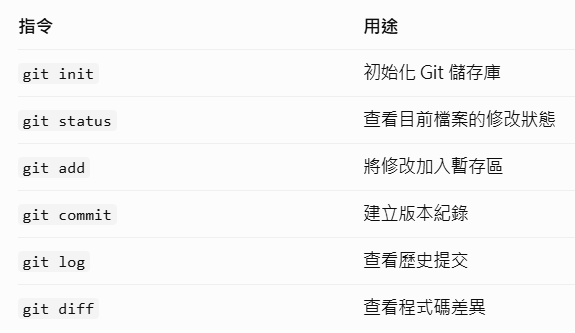
初始化 Git
在 TaskFlow3 目錄輸入:git init
建立檔案
在 VS Code 左側的 TaskFlow3 根資料夾中新增:.gitignore
這些規則會讓 Git 忽略符合條件的檔案。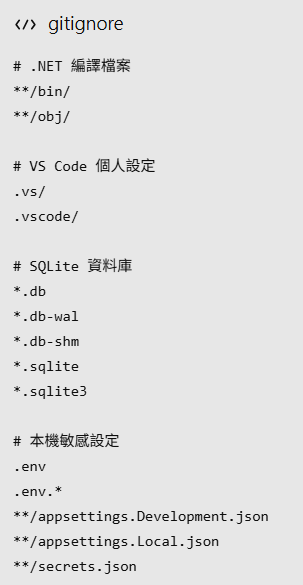
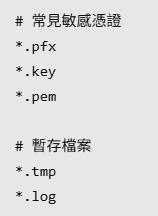
查看 Git 狀態git status
設定提交者資訊
git config user.name "TaskFlow Student"
git config user.email "student@example.com"
加入檔案git add .
接著輸入:git status
再執行:git diff --cached --stat
建立 Commitgit commit -m "Day 27: Refactor task validation"
查看紀錄git log --oneline
在終端機輸入:dotnet test .\TaskFlow3.Tests\TaskFlow3.Tests.csproj
可以啟動 API:dotnet run --project .\TaskFlow3.Api\TaskFlow3.Api.csproj

 414570681

 iThome鐵人賽
 看影片追技術